Spencer - The Mac Window Manager That Remembers Every Layout
Spencer is a powerful Mac window manager that saves and restores custom layouts across Spaces and displays, helping you switch between focused work, meetings, and relaxation without constantly rearranging windows.
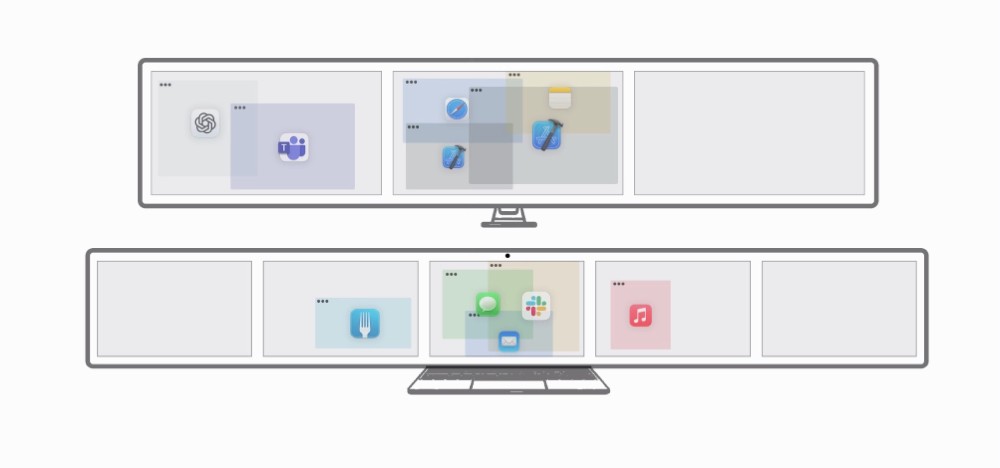
If you are tired of rearranging windows every single time you switch tasks on your Mac, Spencer will feel like a breath of fresh air. It remembers exactly how your apps and windows are arranged across Spaces and displays, so you can jump back into a specific workflow with a single click instead of manually rebuilding it.
Whether you work on a single MacBook screen, dual monitors at the office, or an ultrawide at home, Spencer adapts to your setup. You can create profiles for deep work, meetings, and even downtime, and the app will reveal only the windows that matter for that moment, while quietly hiding the rest in the dock.
Here are the main features that make Spencer stand out:
Save and restore layouts across multiple Spaces: Spencer does not stop at the current desktop. It can remember and restore window layouts across several Spaces, so complex multi desktop workflows are brought back exactly how you like them.
Support for multiple displays and setups: From a single screen to multi monitor rigs and ultrawides, Spencer keeps track of your layout per configuration and adjusts window positions when displays change.
Profile based workflows for work, meetings, and rest: Create profiles like Work, Meetings, and Relax. Switching profiles hides irrelevant apps instead of closing them, so you never lose progress while still keeping your screen clean.
Automatic app launching and smart hiding: When you restore a layout, Spencer launches saved apps if they are not open and hides unsaved ones that are currently visible. Your workspace matches your profile without you managing each window.
Flexible, freeform window arrangement: Spencer is not a snapping tool. You can overlap, resize, and position windows however you like, and the app will remember it. It focuses on faithfully restoring your setup, not forcing rigid grids.
Power users who live with many desktops all day report saving a huge amount of time because they no longer rebuild layouts after restarts or context switches. Instead of thinking about where windows should go, you simply choose a profile and start working.
If you want a calmer desktop, fewer mistakes when screen sharing, and a reliable way to move between focused work and rest, Spencer brings real structure to your Mac without getting in your way.
Download it here - https://macspencer.app/
Read more:

Load More
Our Sponsor: