Screen01: The Free Mac Screen Recorder That Actually Looks Professional
Screen01 is a free, native macOS screen recorder with smooth cursor tracking, auto zooms, cinematic motion, and professional styling. No watermarks, no limits.
If you have ever tried to record your screen on a Mac, you know the frustration. Most tools are either bloated with features you will never use, slap watermarks on your exports, or charge a monthly fee just for basic functionality. Screen01 throws all of that out and gives you a professional-grade screen recorder built specifically for macOS, and it is completely free.
Screen01 is a native Mac app designed from the ground up for Apple Silicon. It is fast, lightweight, and does not waste your time with complicated menus or unnecessary setup. You pick a window or display, adjust your capture area with a visual editor, and hit record. That is it.
What makes it stand out is how polished the output looks without needing a separate video editor. Here are the main features that set Screen01 apart:
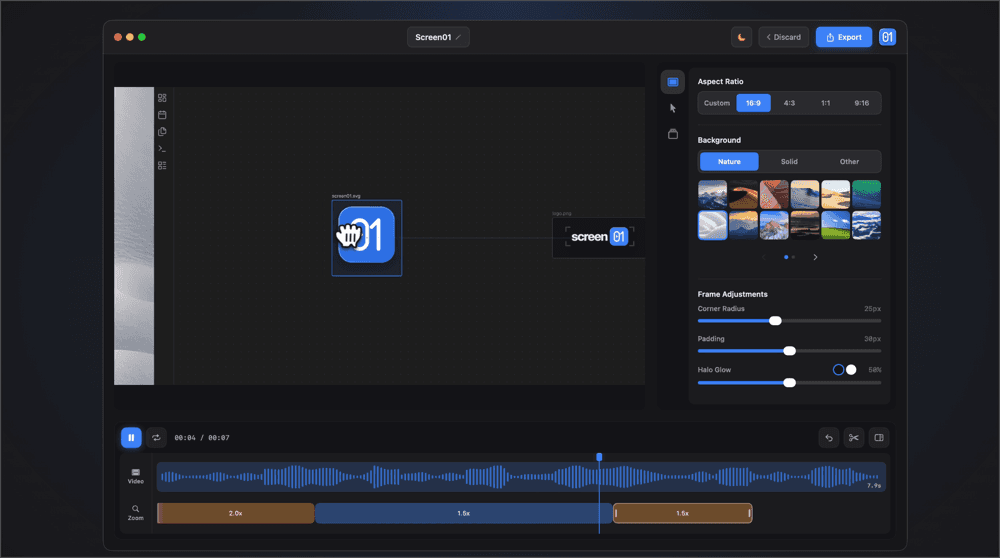
Smart Zoom Controls - You can add automatic or manual zooms to draw attention to specific parts of your recording. A built-in zoom preview lets you see exactly what the viewer will see before you export.
Cinematic Cursor Effects - Screen01 uses interpolated mouse positions to create smooth, natural cursor movement with motion blur and rotation. You can also choose between different cursor styles and customize cursor behavior to match your preferences.
Professional Styling Options - Add custom backgrounds, adjust padding, tweak corner radius, and apply glow effects to make every frame look presentation-ready. No need to open Figma or Photoshop afterward.
Flexible Timeline Editing - A built-in timeline lets you scrub through footage, place blocks, and split video or zoom blocks exactly where you click. You can also control playback speed and zoom transition speed directly.
Multiple Export Options - Choose your resolution, compression level, and aspect ratio for all major platforms. Whether you are exporting for YouTube, Twitter, or a product demo, Screen01 has you covered.
The best part? Every single feature and every export is free with no limits. There are no hidden tiers, no watermarks, and no trial periods. You get the full app from day one.
Screen01 runs on macOS 14 and later and requires Apple Silicon. If you are creating tutorials, product walkthroughs, bug reports, or social media content, this is one of the cleanest recording tools available on the Mac today.
It is the kind of tool that feels like it should cost money but does not. If you record your screen even occasionally, it is worth a download.
Download it here - https://www.screen01.app/
Read more:
Load More
Our Sponsor: