Making Today: The Calm Workspace That Organizes All Your Apps
Making Today turns your scattered tabs, tools, and notifications into one calm, organized workspace so you can focus, execute faster, and stop juggling apps all day.
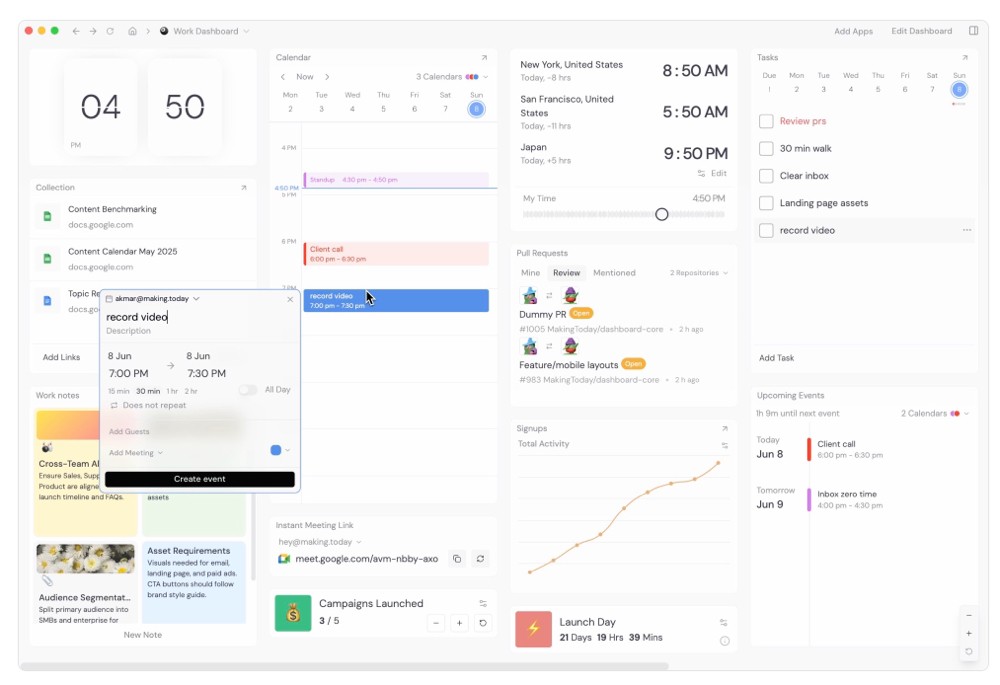
If your day is scattered across Chrome tabs, email, calendars, and chat windows, you are not alone. Most knowledge workers and creators spend half their time just switching between tools. That constant context switching quietly kills focus, energy, and output. This is exactly the problem Making Today is trying to solve by becoming your single place to see and act on everything that matters.
Instead of juggling tabs and windows, you get one organized workspace that shows your files, calendars, meetings, notes, todos, and even dev tools side by side. It feels less like “yet another app” and more like a control center for your day.
Here are the main ways Making Today helps you work smarter.
One workspace for all your tools
You can bring in files, calendars, meetings, notes, bookmarks, design tools, analytics, dev tools, and more into a single dashboard. No need to hunt through browser history or wonder which tab has your Figma or which window has your Google Doc. Everything you need is arranged by context so your workday feels connected instead of chaotic.Drag and drop workflows between apps
Making Today lets you drag items between widgets so your workflow becomes visual and intuitive. Move tasks from an idea note into your daily todo list, organize meeting notes next to your calendar, or line up design work and QA tasks in one view. You work the way your brain thinks, not the way separate apps force you to behave.Custom dashboards for work and life
You can create different dashboards for your job, your side projects, and your personal life. For example, one dashboard for product work with GitHub, calendar, and notes, another for content with your writing app, social media, and analytics, and a simple personal view with journaling and daily todos. Switching context becomes a single click, not a tiring tour of your open tabs.Unified notifications in one clean feed
Instead of being pulled in every direction by random pings, you see all your important notifications in one place. Meeting invites, tickets assigned to you, mentions in pull requests, build statuses, and calendar updates show up in a focused feed. You stay informed without feeling like your brain is under attack all day.Desktop app and browser extension for fast access
Making Today is available as a desktop app, a Chrome extension, and on the web, which means you can reach your workspace quickly from wherever you are working. You start your day there, stay centered there, and close the day there, with a clear picture of what you actually accomplished.Tools will keep multiplying. Tabs will keep growing. The people who win are the ones who find a calm way to keep everything under control. Making Today gives you that calm, structured layer on top of your digital life so you can focus on doing the work, not managing the work.
Download it here - https://making.today/
Read more:
Load More
Our Sponsor: