Bear App - The Cleanest Markdown Notes App
Bear is a beautifully designed Markdown note-taking app for Mac, iPhone, and iPad. Discover its key features, pricing, and why it remains one of the best Apple note-taking apps available.
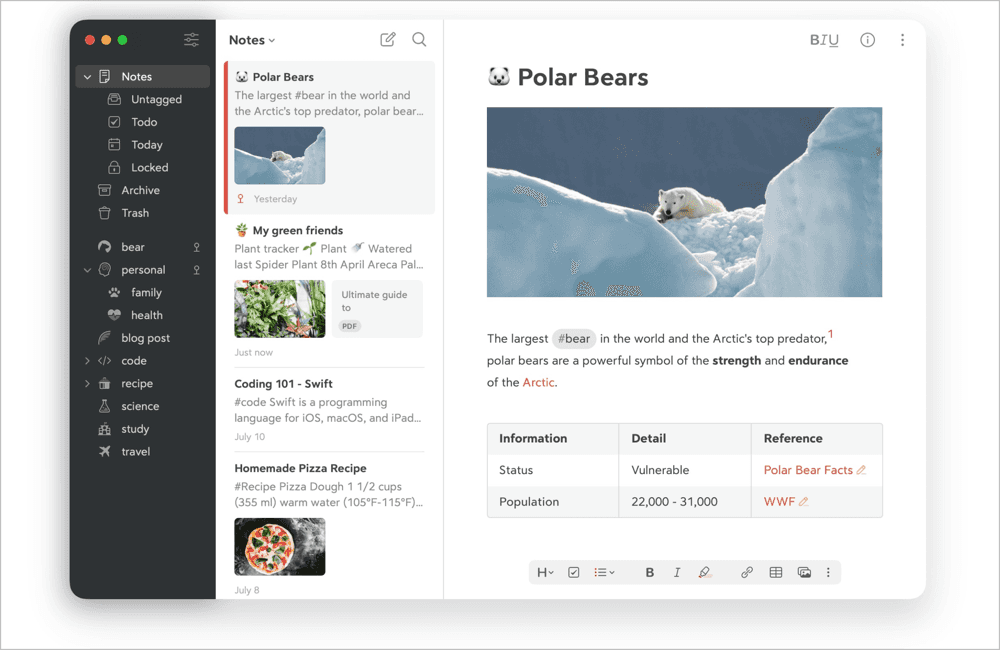
If you have been looking for a note-taking app that actually feels good to use, Bear is worth your attention. Built for Apple devices, it blends Markdown writing with a clean, minimal design that stays out of your way. Whether you are jotting down quick ideas, planning your week, or drafting something longer like a book, Bear handles it all without the bloat you find in most productivity apps.
Bear won the Apple Design Award in 2017 and was named App of the Year in 2016. Those accolades are not just for show. The interface is polished and distraction-free, letting you focus entirely on your writing.
Here are the main features that make Bear stand out:
Seamless Markdown editing. Write with text, photos, tables, and to-do lists inside the same note. Markdown formatting adapts naturally to whatever you are working on.
Flexible tag organization. Instead of rigid folders, Bear uses tags to organize your notes. You can choose from over 250 tag icons and pin your most-used tags for quick access.
Full export options. Free users can export to TXT, Markdown, TextBundle, and RTF. Pro users unlock PDF, JPG, HTML, DOCX, and ePub formats.
OCR search across notes. With Bear Pro, you can search for text inside photos and PDFs, whether in a single note or across your entire library.
Image resizing and cropping. Keep only the parts of an image you need. Rich media previews for links and PDFs help you see more at a glance.
iCloud sync. Pro users get automatic syncing across Mac, iPhone, and iPad, so your notes are always up to date on every device.
Built-in sketching. Draw with Apple Pencil or your finger and insert sketches inline with your text and attachments.
Note encryption and privacy. Your notes live between you and iCloud. Bear cannot see any of your data, and you can encrypt individual notes for extra protection. Apple’s Advanced Data Protection is also supported.
Beautiful themes. The free version comes with 3 themes, while Pro unlocks over 28 themes and 15 app icons for a personalized writing space.
Outline and focus mode. Structure your notes with headings, then fold sections to focus on one part at a time.
Bear is free to download and use with its core features. If you want the full experience, Bear Pro costs $2.99 per month or $29.99 per year (about 15% savings on the annual plan). A 7-day free trial is included so you can try everything before committing.
Users consistently praise the app for being both powerful and simple. As David Pierce of The Verge put it, “In an ever-growing sea of notes apps for Apple devices, Bear is still as good as it gets.”
If you value clean design, fast performance, and a writing tool that works offline and online, Bear is one of the best options in the Apple ecosystem right now.
Download it here - https://bear.app
Read more:
Load More
Our Sponsor: